Adaptive XY Operation

|
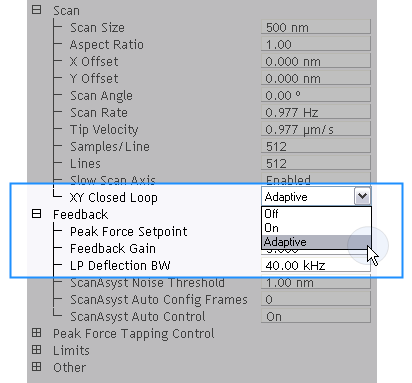
- Click the Expanded Mode icon, to access the XY Closed Loop drop-down box (shown below).
|
| |
- Select Adaptive:
|
| |
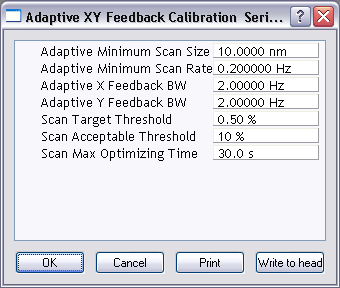
- Click Calibrate > Scanner > Adaptive XY Feedback to open the Adaptive XY Feedback Calibration window:
|
Adaptive XY Controls
The following controls are available for Adaptive XY scanning:
- Adaptive XY Minimum Scan Size: To reduce sensor noise, the feed forward portion of the adaptive XY algorithm is turned off if the Scan Size is below this value.
- Adaptive XY Minimum Scan Rate: The feed forward portion of the adaptive XY algorithm is turned off if the Scan Rate is below this value.
- Adaptive X Feedback BW: This corresponds to the closed loop bandwidth. Lower values result in cleaner images.
- Adaptive Y Feedback BW: This corresponds to the closed loop bandwidth. Lower values result in cleaner images.
- Scan Target Threshold: The adaptive XY algorithm will stop converging when the linearity is below this value.
- Scan Acceptable Threshold: The adaptive XY algorithm is deemed to have failed if the linearity is greater than this number. This usually indicates that something is wrong with the system.
- Scan Max Optimizing Time: The maximum time allowed for the Adaptive XY algorithm to converge.
| www.bruker.com
|
Bruker Corporation |
| www.brukerafmprobes.com
|
112 Robin Hill Rd. |
| nanoscaleworld.bruker-axs.com/nanoscaleworld/
|
Santa Barbara, CA 93117 |
| |
|
| |
Customer Support: (800) 873-9750 |
| |
Copyright 2010, 2011. All Rights Reserved. |
Open topic with navigation