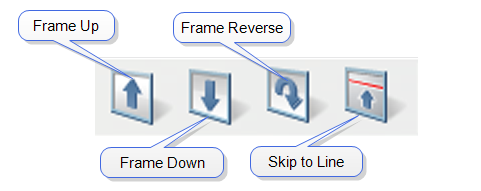
It is often helpful to move quickly to a specified line in a Real-time scan. The Frame Commands, shown in Figure 1, allow you to re-start a scan at a specified scan line.

|
The Frame Up command restarts the Real-time scan at the bottom of the frame. It is an easy way to begin to view an entire Realtime frame from the bottom. By clicking on this button, the Realtime scan restarts and moves up at the bottom of the frame. This allows you to go directly to the start of the frame and not have to wait for the previous frame to end. NOTE: The Frame Up command can be used to view an entire Real-time frame as quickly as possible. When the Scan rates are low, it can take a fairly long time to scan an entire frame. Using the Frame Up and Frame Down commands will allow you to go right to the start of the frame and not have to wait for the previous frame to end.
|
|

|
The Frame Down command restarts the Real-time scan at the top of the frame. This allows you to go directly to the start of the frame and not have to wait for the previous frame to end. NOTE: The Frame Down command can be used to view an entire Real-time frame as quickly as possible. When the Scan rates are low, it can take a fairly long time to scan an entire frame. Using the Frame Up and Frame Down commands will allow you to go right to the start of the frame and not have to wait for the previous frame to end.
|
|

|
Reverses the vertical scan direction of the Real-time scan. | |

|
Restarts the scan at a user-specified line. Line “0” is the bottommost line in the scan. |
| www.bruker.com | Bruker Corporation |
| www.brukerafmprobes.com | 112 Robin Hill Rd. |
| nanoscaleworld.bruker-axs.com/nanoscaleworld/ | Santa Barbara, CA 93117 |
| Customer Support: (800) 873-9750 | |
| Copyright 2010, 2011. All Rights Reserved. |