The Load Probe Panel
The Load Probe panel guides you through probe selection.
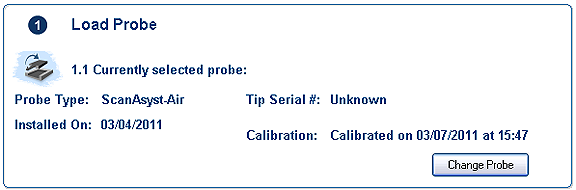
Clicking the Change Probe button opens the Change Probe window:
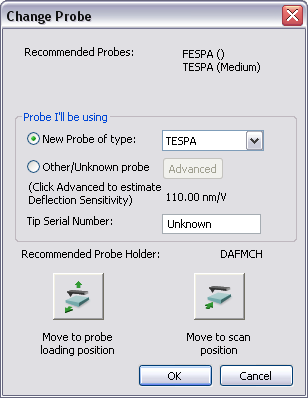
The Change Probe window will recommend a probe type for your imaging mode. Identification of the probe in NanoScope software allows you to take advantage of NanoScope software ease of use features.
You can use this dialog to move the stage and head to the probe loading position using the Move to probe loading position button. Once the probe is loaded on the scanner, use the Move to scan position to return the stage to the previous XY scan position.
When you exit the Change Probe dialog, the Load Probe panel will update with information about the new probe.
Return to Setup View.
| www.bruker.com
|
Bruker Corporation |
| www.brukerafmprobes.com
|
112 Robin Hill Rd. |
| nanoscaleworld.bruker-axs.com/nanoscaleworld/
|
Santa Barbara, CA 93117 |
| |
|
| |
Customer Support: (800) 873-9750 |
| |
Copyright 2010, 2011. All Rights Reserved. |
Open topic with navigation